
Posted by The Office Furniture Experts on Apr 20th 2026
8 Essential Features for Privacy Pods in Offices, Schools and Public Spaces
In open offices and hybrid workplaces, privacy pods have become essential tools for focus, confidentiality, and well-being. These self-contained acoustic booths create controlled spaces for calls, meetings, or deep work while balancing flexibility and comfort. But what separates an average pod from a true long-term solution? The best models combine precise soundproofing, clean air circulation, ergonomic design, and integrated technology. This guide from OfficeChairsUSA highlights eight key features to consider—supported by examples like the Nook Shelter Pod and National Kolo series—so you can confidently choose the right solution for your workspace.
OfficeChairsUSA Privacy Pods Overview
OfficeChairsUSA offers a carefully curated selection of office privacy pods designed for today’s dynamic environments. These acoustic enclosures allow teams to collaborate or focus without excess noise or distractions—a growing challenge as studies show the average worker is interrupted every three minutes and may need over 20 minutes to regain deep focus.
Privacy pods such as the Nook Shelter and Nook Solo Pods provide adaptable, wellness-centered environments with enhanced comfort, ventilation, and lighting controls. They are ideal for phone calls, one-on-one meetings, or short breaks between tasks. Other high-performing options, such as the National Kolo and OBEX lines, offer scalable layouts for teams of varying sizes. Each reflects OfficeChairsUSA’s commitment to improving comfort, focus, and well-being across hybrid and in-office settings.
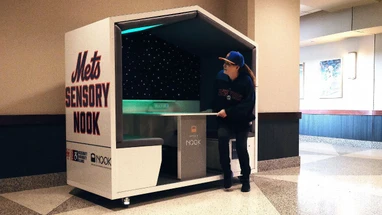
To better support accessibility and inclusion—particularly for neurodiverse users—many pods can be configured with sensory-friendly modules. The Sensory Nook (Nook’s sensory-focused configuration) emphasizes calming, low-stimulus environments through dimmable, color-tunable lighting, soft finishes, and simple, tactile controls. Sensory Nook deployments help reduce sensory overload and create predictable, soothing spaces:
-
In public venues such as Citi Field, Sensory Nook units are used as part of designated sensory-friendly areas to give guests and families a quiet, controllable place for breaks during events.
-
In classroom settings (K–12 and higher education), they function as de-escalation and self-regulation spaces that support inclusive teaching practices and individualized education plans (IEPs), without removing students from the learning environment.
Acoustic Performance and Soundproofing
Sound isolation defines every privacy pod’s core function. Effective acoustic performance ensures speech privacy and reduces disruptive background noise. Soundproofing, measured in decibels (dB), shows how effectively a pod blocks sound transmission between inside and outside spaces.
For most confidential meetings, aim for at least 25–30dB noise reduction. Premium models, such as the Nook Shelter Pod, can achieve 35–40dB, which significantly masks voices even in open-plan environments.
|
Pod Model |
Approx. Noise Reduction |
Notes |
|
Nook Shelter Pod |
35–40dB |
Exceptional isolation for team meetings |
|
Framery Q |
30–35dB |
Balanced acoustic design for 2–4 users |
|
PrivacyPod M |
25–30dB |
Ideal for focused solo work |
Always review verified acoustic test data, and when possible, test pods in person to experience real-world performance. For sensory-friendly applications, prioritize consistent isolation along with effective interior absorption to minimize startling external sounds and manage internal echo that can contribute to sensory fatigue.
Ventilation and Air Quality Systems
Without proper airflow, even the best acoustic environment can feel uncomfortable. Privacy pods rely on active ventilation systems—powered fans that continuously refresh interior air to maintain comfort and prevent heat buildup during extended use.
Smart systems, such as those found in Framery Smart Pods, trigger automatically via motion sensors for energy efficiency. When reviewing options, confirm that ventilation meets building safety, ADA, and fire standards. Quiet operation is equally important; minimizing fan noise preserves the calm, focused environment these pods are designed to deliver.
For accessibility and sensory comfort, look for low-draft diffusers, adjustable fan speeds, and low-VOC materials to reduce odors and irritants. Optional filtration and clearly labeled controls can help users fine-tune comfort levels without adding cognitive load.
Interior Acoustic Treatment and Speech Clarity
In addition to sound blocking, effective pods manage reverberation and clarity through acoustic treatment—materials like PET felt panels that absorb echo and improve speech intelligibility. This ensures voices sound natural on video calls and recordings, even with glass walls or reflective surfaces.
Sustainable production is also gaining traction, with brands using PET materials derived from recycled plastics.
|
Function |
What It Does |
|
Soundproofing |
Prevents noise transmission in and out of the pod |
|
Sound Absorption |
Reduces echo and enhances clarity within the pod |
A well-balanced acoustic interior not only boosts speech clarity but also helps users stay comfortable during longer sessions. Sensory-friendly modules often pair soft acoustic finishes with dimmable, color-tunable lighting and simplified controls to reduce overstimulation. Neutral color palettes, matte textures, and limited visual clutter further support users who benefit from low-stimulus environments.
Technology Integration and Connectivity
Modern teams depend on reliable tech access. Integrated power outlets, USB/USB-C ports, and strong Wi-Fi pass-through keep work uninterrupted. Smart enhancements—such as occupancy sensors, calendar screens, or adaptability in lighting—simplify scheduling and optimize shared spaces.
Adjustable LED lighting, featured in the Nook Shelter Pod, enhances visual comfort for virtual meetings by reducing glare and eye strain. When comparing designs, look for practical built-ins that eliminate the need for additional cables or accessories.
Quick Tech Checklist
-
Power and USB connections
-
Reliable Wi-Fi pass-through
-
Adjustable interior lighting
-
Occupancy or booking sensors
-
Display or laptop mount compatibility
For accessibility, consider visual occupancy indicators, large-format or tactile control interfaces, color-tunable lighting presets (e.g., “calm” or “focus”), and compatibility with assistive listening technologies where applicable. Clear, high-contrast labeling and intuitive presets reduce cognitive load and make shared pods easier for everyone to use.
Size, Layout, and Ergonomics
Privacy pods come in different sizes to match workflow needs. Individual phone booths provide private focus zones; 2–4 person pods support quick huddles; and larger meeting pods, such as the National Kolo 1 Plus, accommodate project teams.
Ergonomics—furnishings designed for comfort and efficiency—is critical. Look for:
-
Adjustable height tables and lighting
-
Supportive seating or standing configurations
-
Accessible entry and floor space
-
Integrated cable management for safety
Before purchasing, review how the pod’s dimensions align with intended use and available space. Models like the ClarityCastle Solo Pod offer compact efficiency ideal for smaller offices or libraries where space is limited.
To promote accessibility and inclusion, verify key clearances and features: low thresholds with wide door openings, reachable controls for seated and standing users, sufficient turning space for mobility devices, and high-contrast edges or markings to aid low-vision users. Sensory-oriented layouts can include simple sightlines, minimal visual clutter, and seated/standing options that help users self-regulate comfortably.
Modularity and Mobility Features
Workspaces evolve, and modular privacy pods evolve with them. Prefabricated panels enable easy assembly, relocation, or expansion without extensive construction. This flexibility makes pods a future-ready investment.
Mobile units such as the HushHybrid include casters for simple repositioning between zones. Most pods from OfficeChairsUSA—including the Nook and National series—can be set up in just a few hours and moved without interrupting nearby workflows. This mobility reinforces the brand’s mission to deliver adaptable office solutions that work wherever you do.
|
Pod Model |
Installation Time |
Mobility |
Expandable |
|
Nook Solo |
1–2 hours |
Yes |
No |
|
National Kolo 1 Plus |
2–3 hours |
Optional |
Yes |
|
HushHybrid |
1 hour |
Yes – Wheels |
No |
Sensory modules—such as tunable lighting kits, privacy curtains, or interchangeable acoustic panels—can be added or reconfigured as needs change. Clear external signage and color cues support wayfinding and help users quickly identify appropriate spaces.
Build Quality, Materials, and Sustainability
High build quality ensures long-term value and dependability. Look for robust aluminum framing, durable acoustic panels, and low-VOC finishes that safeguard indoor air quality. Many privacy pods now incorporate recycled PET materials made from consumer plastics, reducing environmental impact.
Modular pod construction generates about 70% less waste than traditional drywall, making it a sustainable and adaptable choice. The combination of strong materials and eco-conscious design supports both operational performance and environmental objectives.
For inclusive, high-traffic settings—from classrooms to arenas—favor cleanable, durable textiles and finishes, rounded edges, and hardware that’s easy to operate. Hypoallergenic, low-odor materials and matte, low-glare surfaces further enhance sensory comfort while maintaining long-term durability.
Installation, Warranty, and Total Cost of Ownership
Investment in a privacy pod extends beyond the initial purchase. The total cost of ownership includes installation, maintenance, and longevity. Fortunately, many pods—including models available at OfficeChairsUSA—arrive pre-configured for quick installation, some within 1–2 weeks.
Compare warranty coverage when evaluating options. Some brands provide multi-year protection, a smart indicator of build quality and reliability. Pods requiring minimal upkeep deliver stronger ROI through long-term user satisfaction and consistent performance.
When planning for accessibility and inclusion, factor in placement away from high-glare lighting or loud equipment, provide clear wayfinding and usage guidelines, and train staff on sensory-friendly practices. These steps help maximize utilization and ensure the pod consistently supports a broad range of users.
Frequently Asked Questions
What level of soundproofing is needed for effective privacy pods?
For confidential settings, look for at least 25–30dB reduction; top-tier models offer around 40dB for full speech privacy.
How important is ventilation for comfort during long meetings?
Active ventilation keeps air fresh and prevents heat buildup, maintaining comfort during extended use.
What technology features should a privacy pod include?
Look for power outlets, USB charging, Wi-Fi pass-through, and adjustable lighting or sensors to support productivity. For accessibility, consider intuitive, clearly labeled controls and visual occupancy indicators.
What seating and ergonomic options improve user comfort?
Select pods with adjustable tables, ergonomic seating, and flexible lighting for sustained posture and comfort. Ensure adequate clearances and reach ranges to support a wide range of users.
Are privacy pods easy to install and relocate as office needs change?
Yes. Most modular pods from OfficeChairsUSA assemble in hours and move easily as your workspace evolves. Sensory modules and accessibility features can typically be added or reconfigured without major disruption.
By focusing on these eight essential features—acoustics, air quality, interior treatment, tech integration, ergonomics, modularity, sustainability, and total value—you can choose a privacy pod that supports both current and future needs. Explore the Nook and National Kolo series and other thoughtfully curated options at OfficeChairsUSA.